
Golf Rising Star : Career Sim
NovaLevel Co., LimitedSports
4.650.00 Reviews
- Version
- 1.5.4
- Installs
- 50.00K
- Age Rating
- Everyone
Screenshots





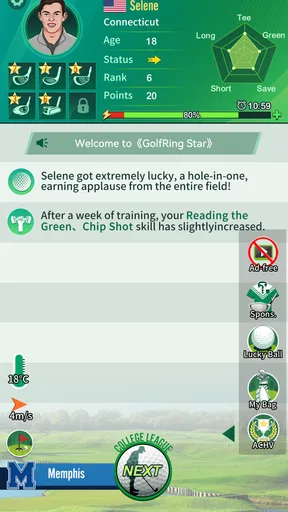
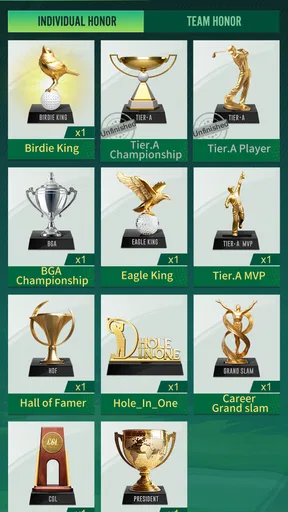
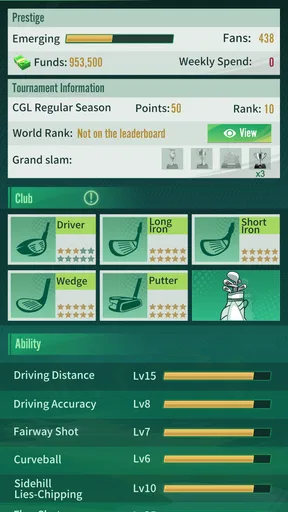
Our Review of Golf Rising Star : Career Sim
 Analysis by Appyee
I approached Golf Rising Star: Career Sim expecting a gentle sports game rather than a demanding golf simulator, and that distinction matters from the first session. This is a free sports game from NovaLevel Co., Limited built around the idea of guiding a golfer’s career, not reproducing every technical detail of a real round. Its appeal is the steady feeling of progress: open the game for a short break, make a few decisions, improve your position, and return later with a clearer sense of direction.
That relaxed structure makes it easy to recommend to someone who enjoys management-flavored games but does not want a complicated spreadsheet. At the same time, it is not the best choice for a player looking for precise swing physics, realistic course strategy, or a traditional multiplayer golf experience. I found that the most important part of enjoying it is understanding what kind of golf game it is. Treating it like a full simulation can make its simpler presentation feel limited; treating it like a casual career progression game makes its strengths much easier to appreciate.
What the career-simulation format feels like in everyday use
The central attraction is the rhythm of building a golfer rather than personally controlling every shot. Instead of demanding the same concentration as a console-style golf title, the game is suited to short visits throughout the day. I can imagine playing it while waiting for an appointment, during a commute break, or in the evening when I want something interactive but not mentally exhausting.
A useful everyday scenario is a player who has ten minutes available and wants a clear stopping point. A career-focused game works well in that situation because progress can be approached in small pieces. You are not committing to a long competitive match or trying to master a difficult control scheme before the game becomes enjoyable. The experience is more about checking the current state of the career, deciding what deserves attention, and seeing whether the next step improves the golfer’s prospects.
That design also makes the game approachable for people who know very little about golf. You do not need to understand club selection, wind reading, putting technique, or tournament rules to begin. The sports theme provides the setting, while the accessible progression supplies the motivation. For a younger player, the Everyone content rating is reassuring, although parents should still remember that optional purchases are present.
My main reservation is that the relaxed format can become less satisfying if you need constant hands-on action. Players who judge a golf game by the feel of every swing may find the career layer too removed from the sport itself. It is closer to caring about a golfer’s development than physically becoming that golfer. That is a valid design choice, but it narrows the audience.
Where new players are most likely to get stuck
The first source of friction is expectation. The store short description calls it Golf Rising Star, while the longer presentation frames it as a relaxing golf-star simulation. I would read that as a signal to slow down and look for the career loop rather than searching immediately for a detailed tee-to-green experience. If the opening feels lighter than a conventional golf game, that is probably the intended direction, not a missing layer of realism.
Another common stumbling point in games of this type is not knowing what deserves attention first. A new player may tap through screens quickly, spend resources on whatever is immediately visible, and then wonder why progress feels uneven. My practical advice is to pause during the first session and identify the game’s main progression path before making every available upgrade. Even without treating the game like a complex strategy title, a little patience helps prevent scattered decisions.
I also recommend checking whether a task is actually complete before leaving a screen. Casual games often separate claiming a reward, starting the next activity, and confirming an improvement. If something appears not to have counted, revisit the relevant career or progress screen rather than repeating the same action immediately. This simple habit avoids wasting time and helps distinguish a display delay from a genuine problem.
The game’s rating of 4.6 from around one and a half thousand ratings suggests that many players find the overall experience appealing, but that number should not be treated as a promise that every player will enjoy the same pace. Ratings usually reflect broad satisfaction, while your own decision depends more on whether you want a calm progression game or a technically demanding golf title.
Setup checks before blaming the game
Because this is a mobile game, I would begin with ordinary setup checks whenever loading or progress feels unreliable. Make sure the device has enough free storage, close other demanding apps, and restart the game cleanly instead of leaving it suspended for a long time. These are unglamorous steps, but they solve many apparent gameplay issues caused by a crowded or tired device.
The minimum operating-system requirement is Android 7.1, so older phones should be checked before installation. Meeting that requirement does not guarantee identical performance on every device. A phone can support the operating system while still struggling with memory, heat, or background activity. If the game stutters, drains the battery unusually quickly, or takes a long time to respond, testing it after a restart is more useful than immediately assuming the career data is damaged.
Network stability is another sensible check for a game that may need to communicate with online services during certain parts of use. If a reward, screen, or progression update seems delayed, I would first move from an unstable connection to a reliable one, then reopen the game and allow the relevant screen time to refresh. I would avoid repeatedly tapping buttons while the connection is uncertain, since that can make it harder to tell which action actually registered.
It is also worth keeping the installed version current. The current version is 1.5.4, and using an older build can create avoidable differences between what the game expects and what the device is running. Updating is not a guarantee that every issue disappears, but it is a sensible first step before more drastic troubleshooting. After updating, I would launch the game once, wait for the main screen to settle, and only then continue with career actions.
Recovering a stalled workflow without losing patience
When a career action appears stuck, my preferred recovery sequence is deliberately conservative. I would stop tapping, note what I was trying to do, return to the main screen if possible, and reopen the relevant section. If that does not help, I would fully close the game, check the connection, and start it again. This preserves a clear mental record of the last action and reduces the risk of making several changes at once.
I would be especially careful before clearing app storage or reinstalling. Those actions can remove local information in some mobile games, and they should not be treated as casual fixes. A restart is low risk; deleting data is not. If the game offers any in-game account or recovery route, use that before taking a destructive step. I would also avoid uninstalling simply because one screen has not refreshed, particularly if the rest of the game is working normally.
A useful recovery habit is to compare the visible result with the expected result rather than relying only on a notification. For example, if you think an improvement was applied, inspect the golfer’s current career state or the relevant progress indicator after reopening the screen. If the result is visible there, the issue may have been a delayed message rather than lost progress. This approach is more reliable than repeating a purchase, upgrade, or claim action.
Players should also keep a close eye on the difference between available resources and resources that are already committed. In a progression game, an action can make a balance look lower while something is underway. Before concluding that currency has disappeared, check whether the game has moved the item into another stage of the career workflow. That small pause can prevent unnecessary support requests and accidental duplicate actions.
When the app is not the real cause
Not every frustrating session points to a software fault. A weak connection can make an otherwise normal action look frozen. A phone running hot can become less responsive. Aggressive battery-saving settings may interrupt background activity or cause the game to reload more often. Low storage can affect the whole device, not only this title. I would test those possibilities before deciding that the game itself is broken.
There is also a human cause: playing without a clear goal. If I move through screens quickly and spend resources impulsively, the career can feel confusing even when it is functioning properly. The better approach is to choose one immediate objective, complete it, and then reassess. That workflow is particularly helpful for players who are used to action golf games and may initially look for a swing control that is not the main focus here.
Purchases deserve the same calm attention. The game is free to download, but in-app items range from $1.99 to $99.99 per item. That is a wide enough range that I would not tap through payment screens casually. I would decide in advance whether I am comfortable spending, check exactly what is being offered, and treat paid progress as optional rather than necessary for enjoying the basic career loop. Anyone wanting a completely purchase-free experience should skip this game or use strong device-level purchase controls.
The presence of optional spending also changes who I would recommend it to. An adult who enjoys setting a personal limit can approach it comfortably. A child may need supervision even though the content rating is Everyone. The age rating describes the type of content, not how easily a player can make an unintended purchase. That distinction is practical and worth considering before handing the device to a younger family member.
Three ways to get more from the career loop
My first tip is to treat each session as a small planning exercise. Rather than opening the game and tapping every highlighted option, decide whether you are checking progress, improving the golfer, or simply collecting what is ready. This reduces the feeling of being pulled between screens and makes short sessions more satisfying. It also helps reveal whether the game’s pace suits you before you spend anything.
Second, use a pause between major decisions. In a casual progression game, immediate rewards can be tempting, but the most visible option is not automatically the most useful one for your current goal. Look at what the action changes, what it costs, and whether it helps the next stage you actually care about. This is a modest strategy, yet it is more valuable here than blindly chasing every available prompt.
Third, separate technical troubleshooting from progression choices. If the game seems slow, do not simultaneously change several career decisions, restart repeatedly, and attempt a purchase. Test the connection or relaunch first, then return to the career once the interface behaves normally. Keeping those steps separate makes it much easier to identify whether the problem was performance, synchronization, or simply an unclear workflow.
A fourth insight is to use the game as a low-pressure companion rather than a substitute for a full golf session. I found the concept more appealing when I stopped expecting every minute to deliver dramatic action. Its value is in the gentle return loop and the sense of guiding a golfer over time. If you enjoy checking in, making measured choices, and watching a career take shape, this framing gives the game room to work.
How it compares with other golf choices
Compared with traditional mobile golf games built around direct touch controls, this title is better suited to players who prefer progression and management over shot execution. A conventional golf game usually rewards timing, aiming, and repeated practice. That can feel more authentic and more immediately skill-based, but it also demands greater attention. Golf Rising Star: Career Sim offers a calmer alternative for someone who wants the theme of golf without turning every session into a test of reflexes.
Compared with a pure sports-management game, it has a more focused identity because the career is tied to a single golfer and the world of golf. That focus can make it easier to understand than a broad team-management title. The trade-off is variety: players who enjoy controlling clubs, lineups, transfers, or detailed tactical systems may find this narrower experience too light.
It also differs from competitive online golf games, where the main appeal is measuring your shot against another person in real time. Here, the motivation is personal progression. That makes it more comfortable for players who dislike pressure or unreliable matchmaking, but less exciting for anyone who needs social competition to stay engaged. Choosing this game over an online alternative depends less on the quality of either one and more on whether you want a private, gradual career.
Who should install it, and who should pass
I would recommend it to casual sports fans, idle-game players who like a clear theme, and golfers who want something lighter than a realistic simulator. It is also a reasonable pick for short sessions because the career concept does not require you to reserve a long block of time. The free entry point makes trying it straightforward, provided you remain aware of the optional purchases.
I would be more cautious about recommending it to serious golf-game enthusiasts. If your enjoyment comes from reading a course, shaping shots, managing wind, and improving through precise control, this may feel too indirect. I would also suggest skipping it if you dislike progression systems that may include paid items, or if you want a game with no need to monitor spending choices.
The game has passed the early adoption stage, with over fifty thousand installs, and its current version gives new players a reasonably clear starting point. Still, popularity does not remove the need to check device compatibility or think about your preferred style of play. The best match is someone who values a relaxing career journey more than technical realism.
My practical verdict after using it
The strongest reason to try Golf Rising Star: Career Sim is its low-pressure career focus. It turns golf into a sequence of manageable decisions instead of demanding constant precision. I like that it can fit around ordinary life, and I appreciate the way its sports setting gives a familiar purpose to the progression loop. The Everyone rating also makes the theme broadly approachable, though purchase supervision remains sensible.
The main weakness is equally clear: the game may not provide enough direct golf action for players who want to swing, aim, and compete personally. Some users may also need to be patient with refreshes, connection-related delays, or unclear progression steps. Those frustrations are manageable when approached methodically, but they can interrupt the relaxed mood if you expect instant feedback every time.
For me, this is best viewed as a calm mobile career game with a golf identity, not as a replacement for a detailed golf simulator. Install it if you enjoy gradual improvement, short check-in sessions, and making thoughtful choices about a golfer’s path. Skip it in favor of a direct-control golf game if physical shot-making is the part of the sport you care about most. Within its intended lane, I found it easy to return to and pleasant to recommend to a friend who wants sports progression without a heavy learning curve.
Verdict
Strengths of Golf Rising Star : Career Sim
- Easy-to-learn controls make it accessible for casual players.
- Career progression gives matches a clear long-term purpose.
- Short rounds fit well into quick gaming sessions.
- Golf courses offer varied challenges as you advance.
- Works well for players who enjoy relaxed sports simulations.
Limitations of Golf Rising Star : Career Sim
- Energy or attempt limits may interrupt longer play sessions.
- Progress can feel slow without frequent upgrades.
- Some challenges rely heavily on timing and precision.
- The interface can feel crowded with several menus and rewards.
- Replay value may drop once familiar courses are mastered.
Other Releases by NovaLevel Co., Limited
View All
American Football Superstar
Sports4.6
Similar Picks in This Category
View All
8 Ball Pool
Miniclip.com4.8

Pooking - Billiards City
AIM TOP GAME TECHNOLOGY LIMITED - pool4.6

Carrom Pool: Disc Game
Miniclip.com4.4

EA SPORTS FC Soccer Mobile 26
ELECTRONIC ARTS4.6

World Soccer League
mobirix4.3

Soccer Cup 2026: Football Game
INLOGIC SPORTS - football tennis golf soccer4.3
Frequently Asked Questions
What is Golf Rising Star: Career Sim?
Golf Rising Star: Career Sim is a mobile golf management and career simulation game focused on developing a player’s professional journey. Rather than only playing individual shots, you typically manage progress through training, competitions, equipment improvements, and career decisions. It is designed for players who enjoy gradual progression, strategic choices, and building a successful golfer over time.
How does the gameplay and career progression work?
The game combines golf-themed activities with career-management mechanics. Players generally improve their golfer’s abilities, participate in tournaments or events, and use rewards to strengthen future performance. Progress depends on making sensible upgrades and managing available resources. The experience is more focused on long-term development and decision-making than on realistic, full-length golf rounds.
Is Golf Rising Star: Career Sim free to download and play?
Golf Rising Star: Career Sim can usually be downloaded without an upfront purchase, although availability and pricing may vary between Android and iOS. As with many free-to-play mobile games, optional in-app purchases may be offered for currency, upgrades, convenience items, or faster progression. Before downloading, check the store listing and your device’s purchase restrictions, especially if children may access the game.
Does the game require an internet connection?
An internet connection may be needed for certain features, including account synchronization, advertisements, updates, event participation, cloud saves, or in-app purchases. Some basic career activities may work when offline, but this can depend on the current version and device. For the most reliable experience, launch the game online after installation and review its behavior before relying on it during travel.
Is Golf Rising Star: Career Sim suitable for casual players?
The game can suit casual players who enjoy checking in regularly, improving a character, and making steady career progress without playing long sessions. However, players expecting a highly realistic golf simulator may find the experience more management-oriented and simplified. The overall appeal depends on whether you prefer incremental upgrades, tournament progression, and strategic resource use over detailed swing mechanics.
Play our best games!


